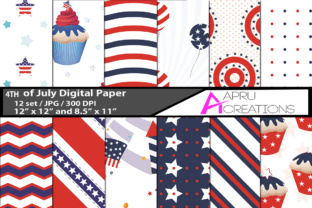
4th of July Digital Papers
Whether you're designing a community newsletter, prepping classroom activities for Independence Day, or launching a limited-time summer promotion, having ready-to-use, print-ready assets makes all the difference. 4th of July Digital Papers delivers exactly that: a curated ZIP file with 12 high-resolution JPG files—each optimized for real-world use without requiring design expertise or expensive software.
What You Actually Get—and Why It Matters
This isn’t a bundle of generic red, white, and blue patterns. Each of the 12 images is thoughtfully composed with balanced negative space, intentional typography placement, and authentic patriotic motifs—think subtle starfield textures, vintage-inspired banners, and clean bunting overlays—not clipart-style graphics. All files are delivered as JPGs (no layered PSDs or editable vectors), but their technical specs are purpose-built for versatility: 300 DPI resolution ensures crisp output whether printed on letter-size handouts or large-format posters, and each image comes in two standard dimensions—12 inches × 12 inches for square layouts (ideal for social media carousels, digital invitations, or scrapbooking) and 8.5 inches × 11 inches for immediate use in flyers, worksheets, or email headers.
Save Time Without Sacrificing Quality
For educators preparing lesson plans in late June, time is non-renewable. Searching for “free 4th of July backgrounds,” resizing mismatched downloads, adjusting color balance to match school branding—these small tasks add up to hours lost. With 4th of July Digital Papers, you open one ZIP, extract 12 files, and start placing content immediately. No cropping needed. No pixelation when scaled. No licensing guesswork—these are royalty-free for personal and commercial use, including client-facing materials like branded event programs or small-business social posts.
Support Consistent, Professional Communication
Small business owners running seasonal promotions often struggle with visual cohesion across touchpoints. A flyer made in Canva looks different from an Instagram Story, which looks different from a printed menu insert—all because they rely on disparate free resources. The uniform quality and style across all 12 images in this set lets you maintain visual continuity. Use the 8.5×11 version for a café’s sidewalk sign announcing “Fireworks & Free Pie,” then repurpose the same design (scaled) as the background for a Facebook event cover photo. That consistency builds recognition—and trust—without needing a designer on retainer.
Empower Creativity, Not Just Decoration
Hobbyists and DIY crafters often hit a wall when digital elements don’t translate well to physical projects. These files were tested for real-world output: the 300 DPI resolution holds up under home inkjet printing, and the 12×12 size works flawlessly for custom cardstock cutting machines (like Cricut or Silhouette). One user printed four 12×12 sheets on matte photo paper, cut them into quarters, and turned them into elegant folded greeting cards—no bleed adjustments, no alignment issues. Another educator used the 8.5×11 versions as printable writing prompts, adding lined sections directly in Preview or Word without obscuring the design.
Who Benefits Most—and How
Freelancers and marketers appreciate having a reliable, on-brand asset library for last-minute client requests—say, a boutique hotel needing welcome signage for its July 4th BBQ within 48 hours. Instead of sourcing, editing, and approving new graphics, they drop in a pre-vetted 8.5×11 background, overlay guest instructions in a clean sans-serif font, and export a print-ready PDF.
Bloggers and content creators use the 12×12 versions as Pinterest pin templates—adding headlines and minimal text overlays in free tools like Photopea or even Google Slides. Because the resolution and composition anticipate text placement, titles stay legible and centered without trial-and-error cropping.
Nonprofits and community organizers rely on clarity and approachability. One neighborhood association used three of the designs—one for their parade flyer, one for the potluck sign-up sheet, and one for the volunteer schedule—creating instant visual unity across materials that otherwise might have looked pieced together.
Realistic Fit Considerations
This set excels when you need polished, production-ready JPGs—not when you require full creative control over individual layers or vector paths. If your workflow depends heavily on editing specific stars, changing flag colors, or isolating elements for animation, these static JPGs won’t replace a layered design file. Likewise, while the motifs are tasteful and versatile, they lean toward classic Americana rather than modern minimalist or abstract interpretations. That’s intentional—it serves broad appeal without veering into cliché—but it means users seeking avant-garde or culturally nuanced visuals may want to supplement with additional resources.
How to Use Them Thoughtfully
Start by matching format to function: use the 8.5×11 files where document structure matters (newsletters, permission slips, agendas), and reserve the 12×12 versions for flexible applications like digital displays, collage bases, or scalable decor. When adding text, leave at least a 0.5-inch margin—especially along the top and bottom edges—since some designs include subtle gradient fades or ornamental borders. And remember: because these are JPGs, avoid repeated saving and re-exporting in editors that compress quality; instead, duplicate your working file before making edits, and always keep the original ZIP intact as your master source.
A Practical Alternative to Starting From Scratch
There’s real value in removing friction—not just for speed, but for mental bandwidth. When a freelance graphic designer has back-to-back deadlines, knowing they can reach for a trusted, high-fidelity background instead of generating one from scratch means more energy goes into layout, messaging, and client feedback—not texture blending or DPI troubleshooting. For a homeschool parent building a themed unit study, it means less time hunting for “safe” images and more time crafting discussion questions or hands-on experiments around the Declaration of Independence.
The strength of 4th of July Digital Papers lies not in novelty, but in reliability. It doesn’t try to do everything—just the things that consistently slow people down: ensuring print fidelity, maintaining visual harmony across formats, and delivering assets that work as-is, not after hours of adjustment. That kind of quiet efficiency is what makes creative work sustainable—especially during busy seasonal windows where timing, clarity, and consistency matter most.