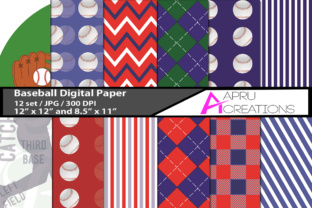
Baseball Digital Papers: High-Quality Printable Designs for Real-World Use
If you're designing baseball-themed materials—whether for a youth league banner, classroom posters, social media graphics, or small business merch—you’ve likely searched for “baseball digital papers.” These aren’t just clipart packs or low-res JPEGs. Baseball Digital Papers refers to professionally crafted, print-ready design assets—often in high-resolution JPG format—optimized for both digital and physical output. The download you’re considering contains 12 unique designs, each delivered at two standard sizes (12×12 inches and 8.5×11 inches) and rendered at 300 DPI. That means crisp detail, clean edges, and reliable performance whether you’re printing on cardstock or layering into Canva or Adobe Photoshop.
Why People Choose Baseball Digital Papers—and Where Expectations Often Misalign
Many users assume “digital paper” means instant plug-and-play versatility—and it can be—but only if the files match your actual workflow. For example, a freelance designer might download these JPGs expecting seamless integration into a layered PSD file, only to find they lack transparency or editable vectors. A teacher preparing a printable worksheet may not realize that 12×12-inch files won’t tile cleanly across standard letter-size paper without manual cropping or scaling adjustments. And a small business owner ordering custom vinyl decals could overlook that JPGs—while excellent for printing—aren’t ideal for cutting machines requiring vector paths (SVG or EPS).
These aren’t flaws in the product. They’re mismatches between user assumptions and file capabilities. Baseball Digital Papers excels when used as intended: as high-fidelity, ready-to-print background textures, borders, or themed overlays—not as editable source files or scalable logos.
1. Assuming All Sizes Work Equally Well for Every Purpose
Just because a design is offered in both 12×12 and 8.5×11 doesn’t mean both are equally practical for your goal. The 12×12 version shines for scrapbooking, large-format prints, or digital backdrops in Zoom meetings. But if you’re making handouts for a Little League parent meeting, the 8.5×11 version saves time—it fits directly into Word or Google Docs with no resizing needed. Before downloading, ask: What’s my primary output method? If it’s home printing or school photocopiers, prioritize the 8.5×11 files first.
2. Overlooking Color Accuracy Across Devices
JPGs embed color profiles, but not all screens render them consistently. A vibrant red baseball stitched onto a navy background may look rich on your calibrated monitor but duller on a shared office printer. To avoid surprises: open one of the JPGs in a free tool like GIMP or Photopea, then use the eyedropper to check RGB values. If you need precise brand alignment (e.g., matching your team’s official Pantone), note the closest RGB equivalent—and test-print a corner before committing to a full batch.
3. Skipping the “Print-Ready” Checklist
Even at 300 DPI, a file isn’t automatically print-ready. Check three things before sending to press:
- Resolution confirmation: Right-click the JPG > Properties > Details tab (Windows) or Get Info > More Info (Mac) to verify it truly reads “300 pixels/inch”—not just “high resolution” in the filename.
- Crop safety: Examine the edges. Are key elements (like stitching or text) placed too close to the border? If so, leave a 0.125-inch margin when trimming—or request a version with bleed from the seller (if available).
- File naming clarity: Rename files meaningfully—e.g., “Baseball-Digital-Paper-Striped-Red-8.5x11.jpg”—so you don’t waste time hunting later.
What to Verify Before You Download or Buy
Not all digital paper collections are created equal—even within the same niche. Before adding Baseball Digital Papers to your cart, scan for these signals of quality and usability:
- Consistent DPI labeling: Reputable sellers specify resolution in the description—not just “high quality.” Vague terms like “HD” or “crisp” don’t guarantee 300 DPI.
- Preview transparency (or lack thereof): Since these are JPGs, expect no transparent backgrounds. If your project requires layering over photos or colored pages, that’s fine—the solid background adds contrast. But if you need drop shadows or floating elements, plan to add those in your editor, not the source file.
- Licensing clarity: Look for plain-language terms about personal vs. commercial use. This set permits both—ideal for educators creating classroom resources or entrepreneurs selling printed planners—but always double-check the license included in the ZIP folder.
- ZIP structure: Open the downloaded archive first. Do files sort logically? Are names intuitive? A messy ZIP with generic names like “IMG_001.jpg” suggests minimal curation—and extra work for you later.
Better Workflow Tips for Real Projects
Here’s how experienced users actually apply Baseball Digital Papers—without friction:
Educators: Import the 8.5×11 JPG into Google Slides as a background, then overlay editable text boxes for vocabulary quizzes or season calendars. No design skills needed—and students get consistent, engaging visuals.
Small Business Owners: Use the 12×12 files as base layers in Canva, then add your logo and contact info using Canva’s built-in resize tool. Export as PDF for professional printing—or share the PNG version directly on Instagram Stories.
Freelancers & Designers: Drag the JPG into Photoshop, convert it to a Smart Object, and apply subtle layer masks or blend modes (like “Overlay” or “Soft Light”) to integrate it smoothly with photography or illustrations—no pixelation, no guesswork.
The value isn’t just in the files themselves. It’s in how thoughtfully they bridge the gap between inspiration and execution—when you know what they do well, and what they’re not meant to do.
A Final Note on Matching Tools to Tasks
Digital papers are tools—not magic wands. Their strength lies in consistency, speed, and visual cohesion—not flexibility or infinite scalability. If you need animated versions, SVG cut files, or editable Illustrator layers, look for complementary assets instead of forcing JPGs beyond their scope. But if you want twelve distinct, print-perfect baseball-themed backdrops—ready to drop into your next project tomorrow morning—this collection delivers exactly that. Just make sure your expectations align with its purpose. That alignment is where real efficiency begins.