Floral Elements and Backgrounds Set: A Versatile Toolkit for Visual Design Across Disciplines
Visual communication relies on more than just color theory or typography—it thrives on texture, rhythm, and organic resonance. Among the most enduring visual motifs in design history, floral patterns carry cultural weight, emotional nuance, and aesthetic flexibility. The Floral Elements and Backgrounds Set delivers this expressive potential in a rigorously structured, production-ready format—designed not as decorative afterthoughts, but as foundational assets for professionals who value precision, scalability, and creative control.
What’s Included—and Why Format Matters
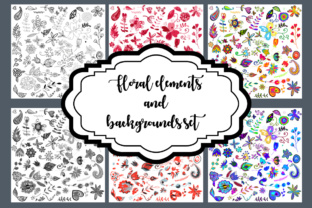
The set comprises two distinct yet complementary components: six Floral Elements files and four Floral Backgrounds. Each is delivered in four native formats—EPS 10, Adobe Illustrator (Ai), Photoshop (PSD), and high-resolution JPG at 300dpi—all configured in RGB mode with layers preserved. This isn’t merely a convenience; it reflects an understanding of real-world workflows across industries.
EPS 10 ensures backward compatibility with legacy systems and supports vector editing in environments where modern CC versions aren’t available—critical for educators maintaining older lab computers or print vendors using standardized RIP software. Illustrator files retain full Bézier control, allowing designers to adjust petal curvature, scale individual stamens, or recolor gradients without raster degradation. PSD files go further: each floral motif arrives on its own layer, with masks, adjustment layers, and blending modes intact—enabling non-destructive compositing for editorial layouts, packaging mockups, or UI overlays. And the 300dpi JPGs? They’re not placeholders. They’re production-grade raster outputs optimized for immediate use in presentations, printed brochures, or web banners where vector rendering isn’t feasible—without sacrificing fidelity.
How Layered Structure Enables Precision Workflows
Layer separation is where this Floral Elements and Backgrounds Set diverges from generic clipart collections. In the PSD and Ai files, petals, stems, leaves, and negative-space cutouts exist as discrete, named layers—not flattened illustrations. This granularity matters in practice.
- A graphic designer building a wedding invitation suite can isolate a single peony element, apply a duotone gradient, and blend it softly behind hand-lettered text—without extracting or masking manually.
- An educator preparing a botany lesson can toggle visibility of stamen vs. pistil layers to annotate reproductive structures, then export clean SVGs for interactive whiteboard use.
- A product packaging team developing sustainable skincare labels can replace background textures with custom paper grain overlays—keeping floral motifs crisp while adjusting perceived materiality.
- A researcher visualizing ecological data might map pollinator frequency onto layered floral diagrams, assigning opacity values per species interaction—leveraging layer-based transparency rather than rebuilding visuals from scratch.
This architecture reduces repetitive labor, minimizes version drift between print and digital outputs, and supports iterative refinement—whether adapting a motif for accessibility (e.g., increasing contrast between stem and background) or localizing content (replacing Latin botanical names with vernacular terms in layered text boxes).
Real-World Applications Beyond Decoration
While floral motifs often appear in greeting cards or textile design, their utility extends meaningfully into functional domains:
Branding with Botanical Intelligence
Business owners launching wellness, herbal, or artisanal food brands frequently seek visual metaphors that convey growth, purity, or seasonality. Rather than commissioning custom illustration—which carries cost, timeline, and rights constraints—the Floral Elements and Backgrounds Set offers vetted, stylistically cohesive motifs that align with brand voice. A lavender sprig element, scaled and desaturated, becomes a subtle watermark on invoices; layered jasmine blossoms form the basis of a responsive website hero background that adapts across breakpoints via CSS layering.
Educational Material Development
Hobbyists teaching watercolor techniques use the high-res JPGs as reference images—printed at actual size for pigment mixing exercises. Meanwhile, university art history departments integrate the EPS files into lecture slides, zooming into vector paths to demonstrate Art Nouveau line work or comparing stylized versus botanical accuracy across eras. Because all files are RGB (not CMYK), they display consistently across projectors, tablets, and student laptops—eliminating color-shift surprises during live demos.
UX/UI and Digital Product Enhancement
In interface design, floral elements rarely serve as primary navigation—but they excel as contextual cues. A gardening app might animate a single layered daisy element to bloom upon task completion; a meditation platform could use a soft-focus floral background (from the set’s four options) as a calming ambient layer beneath breathing guides. Since each background file maintains editable layers, designers can reduce leaf density for low-vision users or increase stem contrast for better foreground readability—without outsourcing adjustments.
Technical Considerations for Cross-Platform Use
Adopting any asset library requires attention to technical boundaries. With the Floral Elements and Backgrounds Set, three considerations stand out:
- Color Space Consistency: All files ship in RGB—not a hybrid or embedded profile. This avoids unintended shifts when importing into Figma, After Effects, or web-based editors that default to sRGB. Designers working toward print output should convert to CMYK only at final export, preserving vibrancy during screen-based review cycles.
- Resolution Integrity: The 300dpi JPGs are not upscaled interpolations. They derive directly from vector sources, ensuring pixel-perfect edges even when enlarged 200% in presentation software. This eliminates the “fuzzy preview” problem common with low-DPI stock imagery.
- Layer Naming Conventions: Layers follow logical, non-abbreviated naming (e.g., “Stem_Shadow,” “Petal_Top_Layer_01,” “Background_Gradient”). This supports automation—scripting tools like Photoshop Actions or Illustrator batch processors can target specific layers by name, enabling rapid style swaps across entire projects.
Who Benefits Most—and How Needs Diverge
While broad in appeal, usage intensity and objectives vary significantly across user groups:
Professionals prioritize time-to-output and integration depth. A marketing agency rebranding a boutique florist leverages the layered PSDs to match client-provided Pantone swatches across all elements—adjusting hue/saturation sliders on dedicated color-correction layers rather than repainting each petal.
Consumers and hobbyists benefit from immediacy. The JPGs allow drag-and-drop use in Canva or Google Slides; the EPS files import cleanly into free vector tools like Inkscape for basic scaling and recoloring—no subscription required.
Researchers and educators rely on reproducibility. Because every file is version-stable (no cloud-dependent updates), syllabi and methodology appendices remain accurate across academic years—even as software versions evolve.
Business owners assess scalability. The set’s modular nature means one purchase supports multiple applications: social media templates, trade show backdrops, product tags, and email headers—all drawing from the same calibrated visual language.
Design Philosophy Embedded in the Files
Beyond technical specs, the Floral Elements and Backgrounds Set reflects a deliberate balance between realism and abstraction. Petal shapes avoid hyperrealism—no photorealistic veins or subsurface scattering—making them adaptable across styles from minimalist line art to lush editorial spreads. Backgrounds employ subtle tonal variation rather than flat fills, creating depth without overwhelming foreground content. This intentional restraint prevents visual fatigue in long-form documents or extended UI sessions.
It’s also worth noting what’s absent: no watermarks, no usage restrictions beyond standard licensing, and no bundled fonts or unrelated graphics. The focus remains on floral form as functional infrastructure—not ornamentation competing with message.
Integration Into Existing Ecosystems
Teams already invested in Adobe Creative Cloud find seamless entry points: Illustrator files open directly into Libraries for shared asset syncing; PSDs import into XD or Figma via plugins that preserve layer hierarchy. For open-source workflows, EPS 10 files convert reliably to SVG using command-line tools like inkscape --export-type=svg, retaining path integrity for web animation libraries like GSAP or Lottie.
Even CMS-driven publishing benefits. WordPress users upload JPG backgrounds as header images with parallax effects; developers embed SVG exports from EPS sources inline for responsive scaling—ensuring floral accents remain sharp on retina displays and foldable devices alike.
Long-Term Value Beyond First Use
Unlike trend-dependent design kits, botanical motifs possess generational longevity. A chrysanthemum element used in a 2024 product launch retains relevance in 2027 rebranding—not because it’s “timeless” in a vague sense, but because its construction anticipates evolution. Need a monochrome variant? Toggle layer visibility and apply black fill. Require motion? Export individual layers as PNG sequences for After Effects. Translate into embroidery patterns? Trace vector paths in digitizing software without loss.
That adaptability transforms the Floral Elements and Backgrounds Set from a one-off resource into a persistent component of creative infrastructure—growing in utility as skills deepen and tools advance.