Christmas Wool Seamless Pattern Set
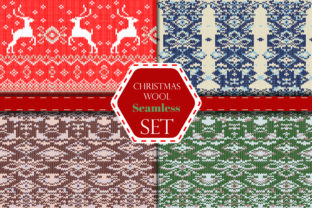
The Christmas Wool Seamless Pattern Set is a curated collection of high-fidelity, production-ready design assets built for creators who need authentic, tactile holiday texture without the overhead of custom illustration or photography. It bridges a specific gap in seasonal design workflows: the need for warmth, craft, and continuity—without sacrificing technical precision or cross-platform compatibility. Unlike generic snowflake or ornament patterns, this set delivers the visual language of hand-knitted wool—cozy, slightly irregular, richly textured—rendered as mathematically seamless vector and layered raster files. That means it scales infinitely, adapts to complex shapes, and integrates cleanly into both print and digital pipelines.
Where It Fits in Your Creative Process
This isn’t a standalone decorative flourish. The Christmas Wool Seamless Pattern Set functions most effectively when treated as infrastructure—not decoration. Think of it like typography or color palettes: it’s a foundational layer that supports consistency across deliverables. You’ll use it before finalizing mockups (to test how wool texture behaves on packaging surfaces), during production (to apply to apparel labels or greeting card backgrounds), and even post-launch (to refresh social media banners or email headers with seasonal nuance).
For example, a small-batch candle maker preparing Q4 inventory might use the EPS vector files to wrap product labels in Illustrator—ensuring crisp edges at any size—then switch to the PSD files with transparency layers to overlay subtle wool texture onto Instagram story templates in Photoshop. The RGB color space and 300 dpi resolution mean no reworking is needed whether outputting to web, print-on-demand, or physical signage.
Compatibility and Cross-Platform Integration
The file structure reflects real-world toolchain diversity. The four EPS 10 vector files are compatible with Adobe Illustrator, CorelDRAW, Affinity Designer, and most modern vector editors—including browser-based tools like Figma (via SVG conversion). Because they’re native EPS 10, they retain full editability: you can recolor individual yarn strands, adjust spacing, or isolate motifs without raster degradation.
The four PSD files operate differently but complement the vectors tightly. Each is delivered with organized transparency layers—base weave, over-stitch highlights, shadow depth, and optional snow-dust overlay—all at 300 dpi and RGB. This lets designers fine-tune opacity, blend modes, and masking non-destructively. A marketer building an email campaign in Mailchimp or Klaviyo can export flattened JPGs directly from these PSDs; a publisher laying out a holiday-themed workbook in InDesign can place them as high-res linked assets and update globally if branding shifts.
No plugins, converters, or workarounds are required. Everything opens natively in industry-standard software—and maintains fidelity through round-trip editing. That reduces version drift, eliminates “lost-in-translation” artifacts, and preserves creative intent across collaborators.
Practical Implementation Tips
Start with intention, not aesthetics. Before applying any pattern, ask: What surface am I simulating? Is this meant to evoke handmade sweater tags, knitted gift wrap, or cozy textile backdrops? The Christmas Wool Seamless Pattern Set includes variations in density and contrast—some emphasize stitch definition, others lean into soft, muffled warmth. Match the variant to the tactile impression you want users to feel, not just what looks “festive.”
Leverage transparency layers strategically. Don’t flatten the PSD files unless necessary. Use the base layer for overall tone, then selectively enable the highlight or shadow layer only where lighting direction matters—like on curved product mockups or angled banner designs. This preserves realism without overcomplicating exports.
Scale with purpose. Seamless patterns fail when scaled too small (loss of texture legibility) or too large (repetition becomes obvious). Test at actual output size: for business cards, use 75–100% scale; for wall decals or fabric prints, drop to 30–50%. The vector files handle this effortlessly—but always preview in context, not just in isolation.
Batch-process smartly. If you’re applying the same wool pattern across dozens of assets (e.g., holiday social posts), save a Photoshop Action or Illustrator Graphic Style using one of the included files as a template. That locks in blend mode, opacity, and tiling settings—cutting repetitive setup time by 80% or more.
Workflow Examples Across Roles
- Freelance graphic designers: Drop EPS files directly into brand guideline documents as swatch assets. Clients see exactly how wool texture integrates with logo lockups and typography—no guesswork, no revisions.
- Educators and course creators: Use the PSD layers to build annotated teaching slides—turning “how texture conveys mood” into a visible, editable demonstration rather than abstract theory.
- Small business owners: Apply the JPG versions to Canva templates for holiday sale banners. Since they’re 300 dpi and RGB, they render sharply on desktop and mobile without pixelation or color shift.
- Bloggers and content marketers: Embed the vector files as inline SVGs in blog posts about sustainable gifting or handmade trends—ensuring fast load times and crisp display on all devices.
- Product photographers: Overlay the PSD files as non-destructive layers in post-processing to add subtle background texture—eliminating the need for physical wool backdrops and studio reshoots.
Long-Term Usability and Quality Control
This set is built for reuse—not one-off projects. All files follow consistent naming conventions (wool_cable_knit_seamless.eps, wool_ribbed_transparent.psd) and are grouped logically in folders. That makes asset management predictable, especially when shared across teams or archived for future seasons.
Quality control happens upstream: every pattern was tested for true seamlessness at multiple zoom levels, verified for RGB color accuracy against standard sRGB profiles, and confirmed to tile without visible breaks—even when rotated or skewed. There are no hidden raster elements in the EPS files, no flattened layers in the PSDs, and no embedded fonts or external links that could break in handoff.
Because the textures are rooted in physical wool properties—not stylized abstractions—they age well. A pattern applied to a 2024 holiday catalog will still feel cohesive alongside 2025 updates, avoiding the dated look of trend-dependent clipart or over-rendered 3D assets.
Organizing and Maintaining Your Assets
Treat the Christmas Wool Seamless Pattern Set like core brand infrastructure. Store the original folder in a cloud-synced assets library with clear permissions. Create a subfolder for “adapted versions”—flattened JPGs for web, SVG exports for developers, or recolored variants for specific campaigns. Tag everything with metadata: “wool,” “seamless,” “holiday,” “texture,” “vector,” “PSD.” That ensures quick retrieval whether you’re pulling assets for a last-minute pitch or auditing resources for next year’s planning cycle.
Review usage quarterly. Which variants get used most? Where do gaps appear? That informs whether to expand your library—or refine how you deploy what you already have. The goal isn’t to collect more assets, but to deepen mastery of the ones that align with your actual workflow.
Ultimately, the Christmas Wool Seamless Pattern Set earns its place not by being “festive,” but by being frictionless: technically sound, consistently usable, and quietly adaptable across roles, platforms, and timelines. It removes guesswork from texture application—so you spend less time troubleshooting tiling and more time communicating warmth, care, and intention.